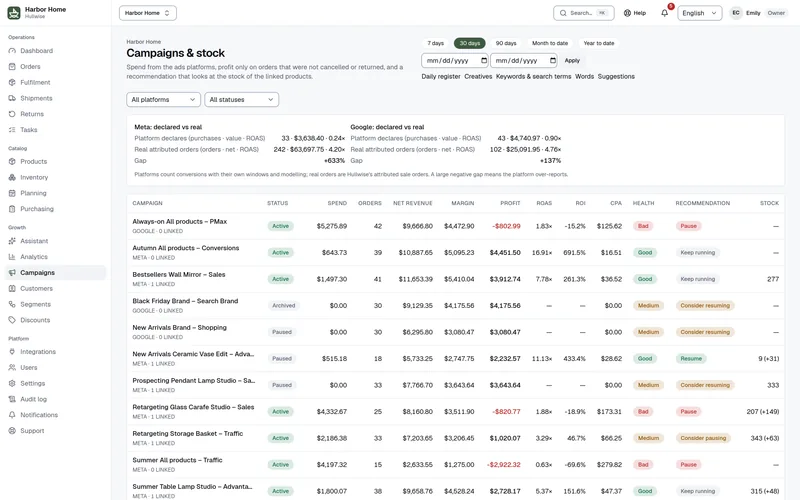
Campaigns linked to stock
Meta, Google and TikTok campaigns linked to products, down to ad, keyword and search term. Profit uses the same revenue as your P/L. Recommendations check the stock of linked products before telling you to spend more.
Operations and profit platform for Shopify stores
One platform for orders, stock, purchasing, returns, marketing attribution and P&L. Every number comes from the same data, so you decide on profit, not on guesses.
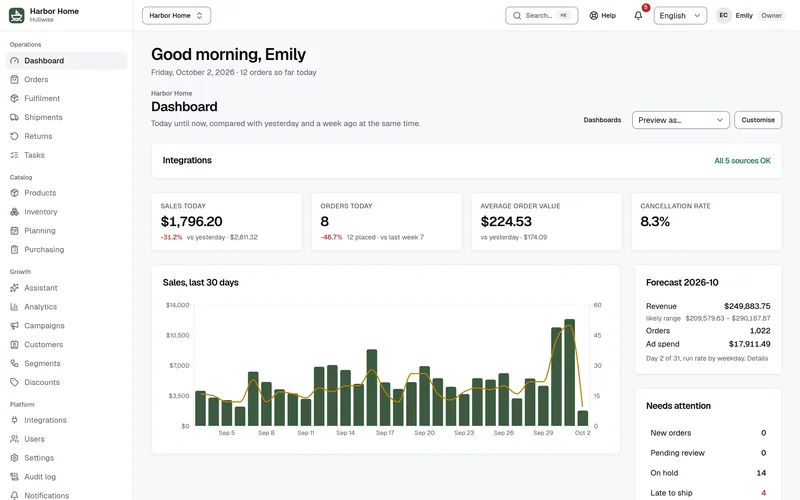
Customer case
Orders and revenue more than doubled while the team stayed the same size. Purchasing, orders and campaigns now live in one place.
Everyone works in Hullwise: no extra hires, no handovers between tools.
Over 200 more products, with stock and purchasing kept under control.
Purchasing, orders and marketing campaigns are managed together, on the same numbers.
Server-side Conversion API sends Meta the orders that really happened, and campaigns improved.
For performance marketers
Ad platforms grade their own homework. Hullwise ties every order, cost and return back to the campaign that earned it, so you scale what really makes money.
See your own campaigns on real profit in a 30-minute walkthrough.
Pillar 1
Each order is matched to the campaign, ad set and ad that brought it in. Then Hullwise subtracts what the platform never sees: product cost, shipping, payment fees, returns and ad spend. You read profit, not a self-reported ROAS.
Retargeting: bestsellers
Prospecting: new arrivals
Brand search
Pillar 2
Customers rarely buy on the first visit. Our own first-party pixel records the whole journey, from the first ad to the email to the search that closed it, and Hullwise splits the credit with the model you pick. Switch model and every campaign number updates.
Last click. All credit to the final touch before the purchase.
Example journey with illustrative credit
Day 0
Ad click
Meta
Credit
0%
Day 3
Credit
0%
Day 5
Search
Credit
100%
Day 6
Purchase
Pillar 3
Hullwise sends each platform the real conversions straight from your order data, server to server. Their algorithms learn from truth: paid orders with their real value, without cancelled or returned ones.
Platform pixels live in the visitor's browser, and browsers increasingly stand in their way. A meaningful share of conversions never reaches the platform, so it gets fewer signals and optimises worse.
Short-lived cookies
Browsers cap how long tracking cookies live, so a customer who comes back a week later looks like a stranger.
Ad blockers and tracking prevention
Blockers and built-in protections stop the pixel script from firing at all.
iOS and Safari limits
App Tracking Transparency and Safari ITP cut the identifiers platforms depend on.
Consent banners
When a visitor declines tracking cookies, the browser event is never sent.
One source of truth
The store's own orders, deduplicated against the browser event so nothing is counted twice.
Real value, not cart value
Order value and margin, with cancellations and returns reflected.
Three platforms, same treatment
Meta, Google and TikTok get the same controls and the same data.
Test events and per-platform switches
Check events arrive before you go live, and activate each platform on its own.
For operations managers
Orders, shipments, returns, stock and purchasing share the same data. Everyone sees the same truth, and nothing gets lost between tools.
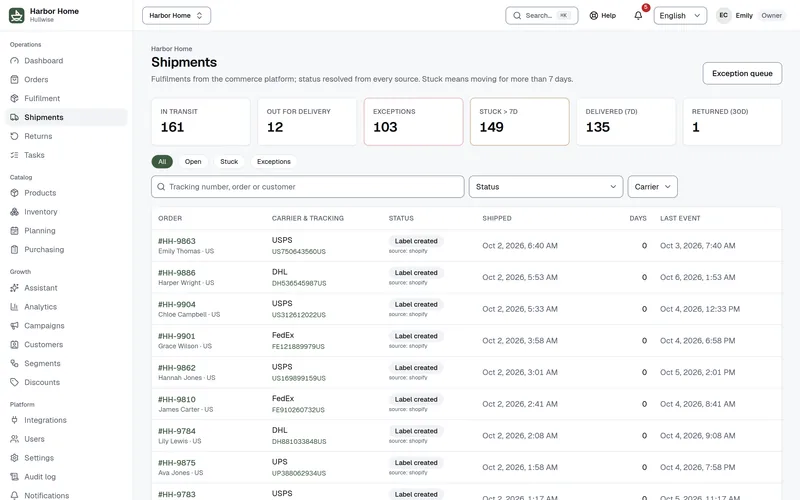
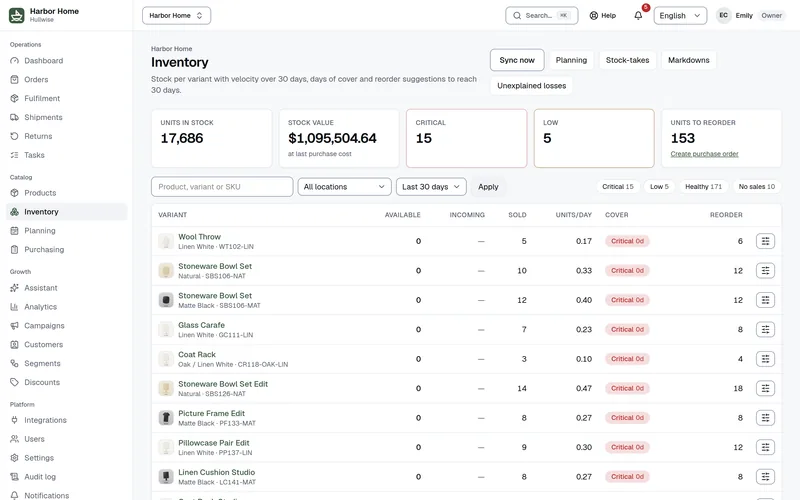
Forecasts work at SKU level, from your real sales, and end in a purchase order your supplier can act on.
Example
Linen throw, sand
SKU-1042-B
Reorder 240 units to cover the next 60 days.
Reorder 240 units — send PO to supplier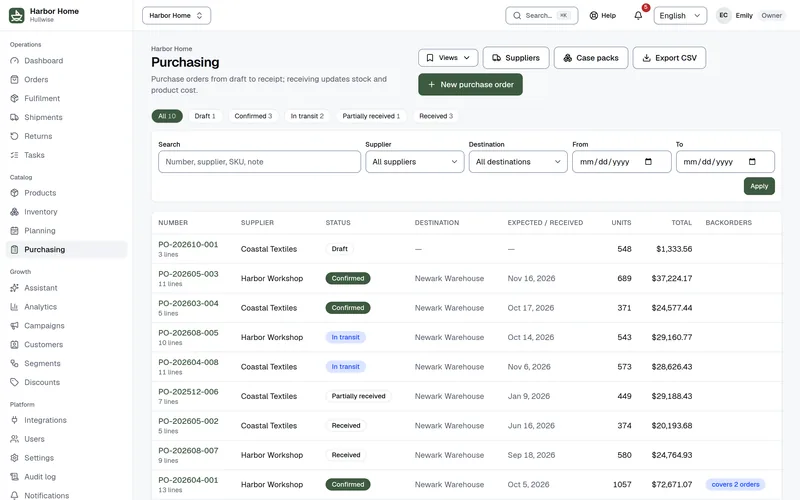
For founders and CEOs
Your team works in unison on the same data, and you see revenue, profit, returns and stock risk in one place, with the problems already pointed out.
Control tower
Illustrative exampleRevenue
$k
Orders
Avg. order value
$
Profit
$k
Return rate
%
Stock at risk
Needs attention today
01
A team that moves together
Support, operations, marketing and finance read the same orders, stock and margins.
02
No surprises
Stuck parcels, low stock and money-losing campaigns reach you before they reach your customers.
03
Marketing spend that works harder
Campaigns are tied to real profit and real stock, so budget goes where it pays back.
See your own numbers in a 30-minute walkthrough.
Orders, stock, costs and customers live in one place. Receive a purchase order and the P/L updates. Cancel an order and the campaign profit follows.
Meta, Google and TikTok campaigns linked to products, down to ad, keyword and search term. Profit uses the same revenue as your P/L. Recommendations check the stock of linked products before telling you to spend more.

KPIs with period comparison and a P/L net of tax: product cost, shipping, payment fees, returns and ad spend. Payouts, actual fees and a tax report. Every number opens the orders behind it.

Ask about sales, profit, campaigns, stock, returns or customers at risk. Every answer cites its figures, period and filters, with a link to the report. Included in every plan, read-only.

One clear status per order, set by rules you control from payment and fulfilment. Timeline with author and diff, internal notes with mentions, customer history, duplicate detection, bulk actions and saved views.
Tracking, carrier, days in transit and parcels stuck beyond your threshold. Queues for late-to-ship orders and delivery exceptions. One status per shipment, resolved from every source.
Variants with any options, stock per location, sales velocity, days of cover and reorder suggestions. Stock-takes, adjustments with reasons, price and status written back to Shopify.
Suppliers and purchase orders from draft to receipt, with incoming stock on every product. Orders waiting for stock are held as backorders and released on receipt. Receiving updates product cost, and the P/L follows.

Reasons, windows and workflow states set per store, synced with Shopify returns. Refund, exchange or voucher, optional restock per location, analysis by product and reason.

Codes synced with Shopify, single or in bulk pools of unique codes. Orders, revenue and margin on every code.

Customer profiles with value, frequency and last order. Nested AND/OR segments with a live preview, an RFM matrix and CSV export.
Dashboards you build
Each team arranges its own home from a widget catalog, with custom metrics and filters. Widgets follow each role's permissions.
Your AI tools on your data (MCP)
Connect Claude, ChatGPT, Cursor or any MCP client. It reads the store's data with the signed-in user's permissions. Off until an owner turns it on.
TikTok Ads
Campaigns, ad groups and ads with daily metrics, next to Meta and Google in one profit view. Pause and resume without leaving the app.
Payments and payouts
Manual payments and partial refunds, payouts and actual processor fees, and a tax report by period.
Fast lists
Search everything with ⌘K, save views, run bulk actions and export any list to CSV.
Integration health
Every connection shows its last sync and last error. A watchdog resyncs stale sources and alerts owners.
Roles and audit log
Six roles with permissions per page and action. Every change is logged with author and diff. Owners can export all their data.
Every connector comes with your plan. No extra fee, no add-on. Hullwise guides you through each one, inside the product.
Shopify
Orders, customers, products, stock, fulfilments, returns and discounts, with changes written back.
Meta Ads
Campaigns, ad sets, ads and daily metrics, with pause and resume after your confirmation.
Google Ads
Campaigns and daily metrics from Google Ads.
TikTok Ads
Campaigns, ad groups, ads and daily metrics, with pause and resume.
Google Analytics 4
Traffic and conversion rates from the store's GA4 property.
Address validation
Checks shipping addresses with the store's own validation key.
AfterShip
Shipment status from the carrier's scans, for the shipments page and the P/L.
Qapla’
Shipment status from the courier: parcels pushed, status changes by webhook.
Elogy
Confirmed orders go to your Elogy warehouse; the shipment status and the stock come back.
Metakocka
Confirmed orders go to your Metakocka warehouse; the shipment status and the stock come back.
Shopify Payments payouts
Payouts and actual payment fees, used in the P/L.
Slack
Team notifications in your Slack channels, routed per event.
Product names belong to their owners; Hullwise is not affiliated with them.
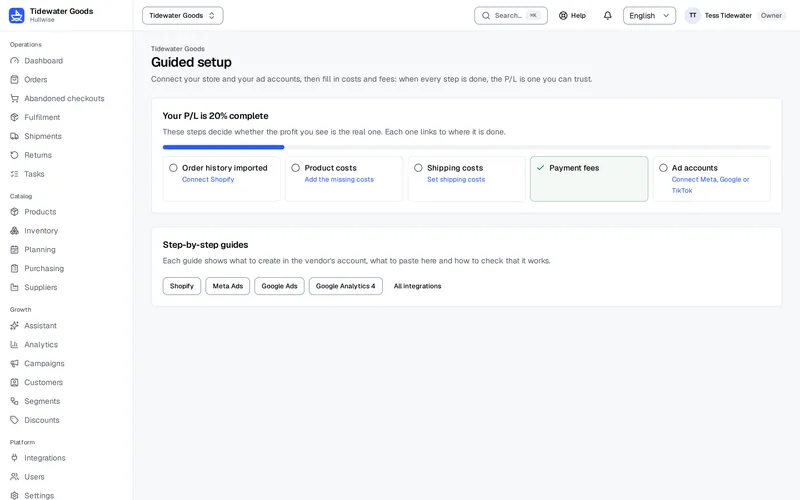
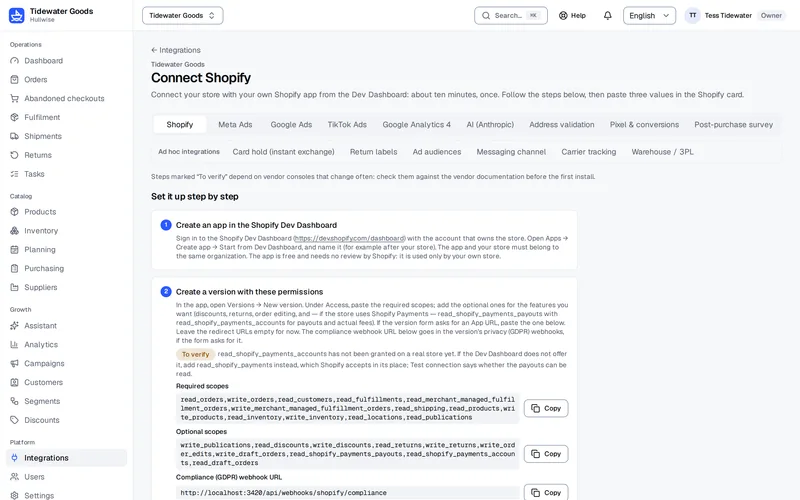
Hullwise guides your store through its own setup. Every connection has a step-by-step guide, and a score shows how close your P/L is to numbers you can trust. Prefer to hand it over? Our team does it for you.
Create the app in Shopify and paste its credentials. Your order history imports in the background.
Meta, Google Ads and TikTok Ads: sign in and pick the accounts. Spend and campaigns arrive every day.
Sessions and traffic sources from your GA4 property, next to orders and ad spend.
Product costs one by one or from a CSV, plus shipping costs and payment fees. This is what turns revenue into real profit.
The guided setup shows "Your P/L is N% complete" and links every missing step.
A brand doing 1 to 5 million a year typically pays for separate profit analytics, inventory planning and returns tools, and runs its operations on shared spreadsheets. Hullwise replaces those. Email and SMS, the helpdesk and shipping labels stay where they are.
What Hullwise replaces
$500 to $1,300 per month
typical list prices of these tools, before the hours spent reconciling them
Hullwise Growth
$433 per month
up to 5,000 orders per month
Hullwise does not send your emails and SMS, answer tickets or print shipping labels. Those tools stay exactly where they are, and Hullwise reads what it needs from them.
Email and SMS (Klaviyo)
Keeps sending your flows and campaigns. Hullwise reads the sends and the revenue they bring, for the P/L and the campaign results.
Helpdesk (Gorgias, Zendesk)
Your team keeps answering tickets there. Hullwise shows the conversations on the order and on the customer.
Carriers and labels (ShipStation, Sendcloud)
Labels are still printed in your shipping tool. Hullwise reads the real shipping cost and the tracking, for the P/L and the shipments page.
Typical list prices for mid-sized Shopify brands, counting only the tools Hullwise replaces. Your current stack may cost less or more; the demo includes a comparison on your actual tools.
Four plans, sized by your monthly orders. Every core module and unlimited users on every plan. No annual contract.
Every core module
$159/month
Up to 1,500 orders/month
Extra orders: $106 per 1,000
AI assistant: 25 questions/month
More volume, plus your AI tools
$433/month
Up to 5,000 orders/month
Extra orders: $66 per 1,000
AI assistant: 200 questions/month
Optional setup $1,500, one-off
High volume, longer history
$890/month
Up to 15,000 orders/month
Extra orders: $46 per 1,000
AI assistant: 1,000 questions/month
Optional setup from $3,000, one-off
Above Scale, tailored terms
On quote
Above 15,000 orders/month
AI assistant: questions per contract
Optional setup: on quote
Orders above the included ones are billed at month end, per started block of 1,000. The price per block falls as the plan rises.
Need more AI assistant questions in a month? Add 500 for $49, valid until the end of that month.
Optional service
Skip the setup work. Our team connects Shopify, your ad accounts and GA4, imports your order history, configures your costs and sets up your status rules. You start on a store that is ready to run.
Not required: every plan includes the guided setup, free, and you can connect everything yourself in an afternoon. Paid once through a payment link we send you.
Ask for the setupOptional service
Need to connect a warehouse, an order-tracking system, an email service or any other tool? Tell us what you use and we prepare a quote built around your stack.
Priced on your stack
Request a quoteExtra features, switched on per account by our team. Every integration is included in every plan. The core works with any payment method; what is specific to your operation lives here.
Campaigns to your segments with a control group: a stable holdout per customer, the send recorded from the tool you already use, and the incremental orders, revenue and margin each campaign really produced.
$99/month
For stores that sell refills, boxes or memberships through Shopify Subscriptions, Recharge or Loop: real profit per subscriber, churn split into voluntary and failed payments, stock forecast for upcoming renewals and a recovery queue for declined cards.
$99/month
For stores that collect on delivery: confirmation queue with call outcomes, operator assignment, a delivery score explained factor by factor and risk flags on recipients.
$99/month, 1,000 confirmed orders included, then $35 per 1,000 more
The connectors these add-ons use (WhatsApp via Spoki or Meta's Cloud API, Shopify Subscriptions, Recharge, Loop) come with them at no extra charge.
Book a 30-minute slot. We open Hullwise on the demo store, or on an export of your own orders if you prefer, and show your profit by order, ad and product. No slides, no obligation.
The first stores start with a 30-day pilot on their live store, with their real orders and campaigns, not on a demo. If you continue, the list price of your plan is locked for 12 months. In exchange we ask for a case study: what changed in your numbers, published only with your approval.
No. Plans are monthly and you can cancel at the end of any month. The annual option only gives you two months free.
Connecting Shopify and your ad accounts, importing your order history, and configuring status rules, taxes, payment fees, product costs and users. Follow the guided setup on your own for free, or have our team do it for a one-off fee that depends on the plan (Starter has none).
All of them. Card, wallets, PayPal, bank transfer, buy now pay later and cash on delivery are treated the same. Cash on delivery tools are an add-on, only if you need them.
Every table carries the account identifier and the database enforces row-level isolation on every query. An account can never read or write another account's rows, and automated tests prove it. Credentials are encrypted at rest. Every action of our support team in your account is recorded in your audit log.
Yes, on every plan, with nothing to connect: 25 questions a month on Starter, 200 on Growth, 1,000 on Scale, and Enterprise per contract. If you need more, a top-up adds 500 questions for $49 until the end of the month. The assistant only reads the reports the user's role can open, never changes data, and each answer shows the figures it used.
Nothing stops. Extra orders are billed at month end per started block of 1,000: $106 on Starter, $66 on Growth, $46 on Scale. If it happens two months in a row we suggest the next plan, which usually costs less.
Book a demo. We open Hullwise on the demo store, or on an export of your own orders, and show where your margin goes.
Tell us about your store. We reply within one business day.